
I made it on Kron 4 News! Wish I gave a better interview answer. But it’s ok. I made it! 😀
Month: August 2018
-

Installing and Configuring Kubernetes with Docker on MacOS
Install Kubernetes for MacOS
Installing Kubernetes (K8S) with Docker installed on my machine caused an error:
The connection to the server was refused – did you specify the right host or port?
I tried the following:
- Installed manually via: curl -LO https://storage.googleapis.com/kubernetes-release/release/$(curl -s https://storage.googleapis.com/kubernetes-release/release/stable.txt)/bin/darwin/amd64/kubectl
- Installed via Homebrew: brew install kubernetes-cli
I found that installation of K8S can be done through Docker. Do the following to automate the installation of K8S on your machine (mine is MacOS):
- On MacOS menu bar, click on Docker.
- Click: Preferences
- Click: Kubernetes
- Checkbox: Enable Kubernetes
- Select Kubernetes
- Click: Apply
The UI should look the following:
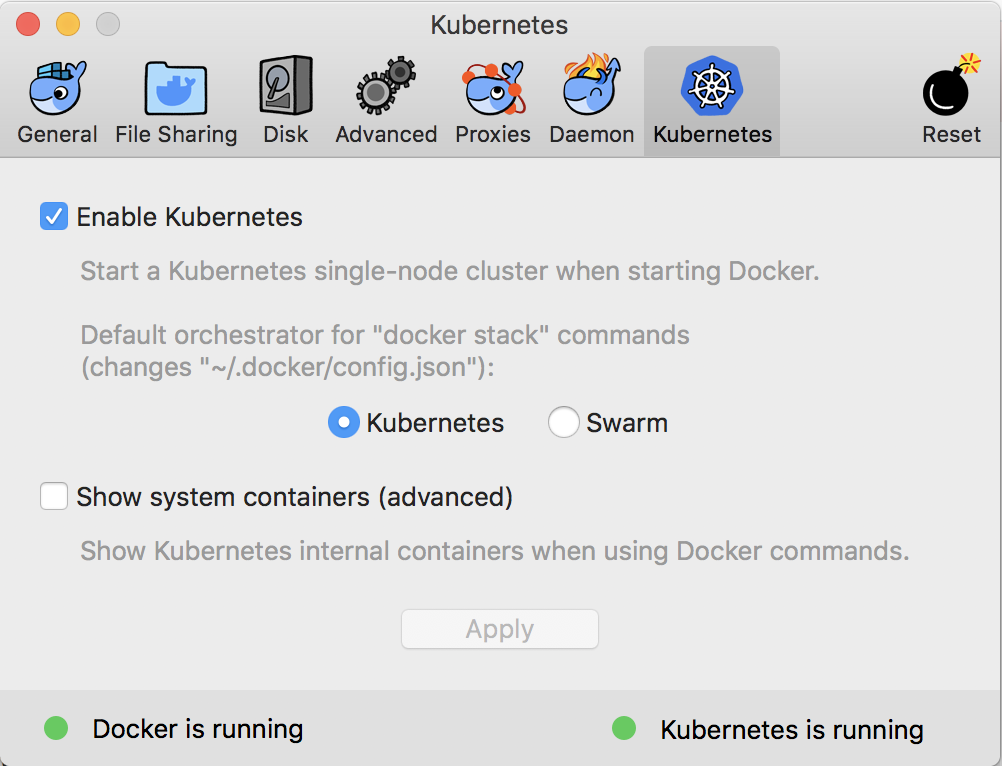
Kubernetes Section of Docker UI Configuration Install Minikube
Do the following to use Homebrew to install Minikube:
- brew cask install minikube
- Install MacOS hyperkit driver.
- Point to hyperkit: minikube start –vm-driver=hyperkit
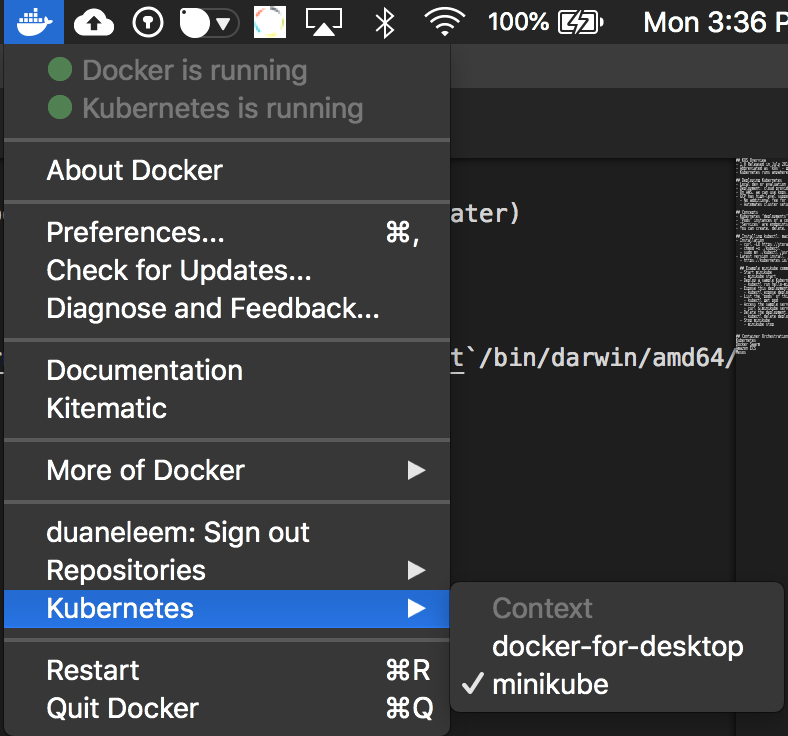
Switch between Docker for Desktop or minikube by clicking on the Docker icon on the menu bar, hover to Kubernetes, and choose the driver.
Uninstall Minikube
The latest Docker for MacOS (Docker v18) comes with Kubernetes built-in and we don’t need to use Minikube for local development. We can use docker-for-desktop! 🙂
- brew cask uninstall minikube
- kubectl config delete-context minikube
Switching Context
We can switch between Docker for Desktop (DFD) and Minikube with two ways. One way is through kubectl
- Get a listing: kubectl config get-contexts
- Switch to DFD: kubectl config use-context docker-for-desktop
- Minikube: kubectl config use-context minikube
The alternative is using Docker for Desktop menu:
kubectl Commands
Some of the commands I use commonly on Kubernetes.
Apply yaml Config kubectl apply -f ./deployment.yaml Export Port kubectl expose deployment tomcat-deployment –type=NodePort Service Details kubectl describe service/tomcat-deployment