Month: October 2017

  • Notes on React & ES6

    There are two modes for development: Single Page Applications, Multi Page Applications

    Build Workflow

    1. Dependency Management Tool: npm or yarn
    2. Use Bundler: Webpack
    3. Compiler: Babel + Presets
    4. Use Development Server (Docker preferrably)

    Single Page Applications (SPA)

    For React 16, I like to scaffold a new project using the create-react-app CLI:

    npm install -g create-react-app

    Multiple Page Applications (MPA)

    ES6 Basics

    Functions

    // Alternative function declaration.
    const myFunction = (someVar, anotherVar) => { return console.log(somevar + " and " + anotherVar); }
    
    // Removing brackets and return keyword.
    const myFunction = (someVar, anotherVar) => console.log(somevar + " and " + anotherVar);
    

    Exports & Imports (Modules)

    Export example from JSON object.

    // person.js
    const person = {
        name: "Duane"
    }
    
    export default person;
    
    // utility.js
    export const clean = () => {}
    export const baseData = 10;

    Import example of the above class.

    // Example 1
    import person from "./person.js";
    import prs from "./person.js";
    
    // Example 2
    import { baseData } from "./utility.js";
    import { clean } from "./utility.js";

    From lecture:

    Exports and Imports

    Spread & Rest Operators

    Spread Operator: …

    Yes, three dots 🙂

    // Spread
    // Used to spread out array elements or object properties.
    const newArray = [...oldArray, 1, 2];
    const newObject = {...oldObject, newProp: 5}
    
    // Rest
    // Used to merge a list of function arguments into an array.
    function sortArgs(...args) {
        return args.sort();
    }

    Destructing

    Easily extract array elements or object properties and store them in variables.

    // Array Destructing
    [a, b] = ["Duane", "Leem"];
    console.log(a); // Duane
    console.log(b); // Leem
    
    // Object Destructing
    {name} = {name: "Duane", age: 37}
    console.log(name); // Duane
    console.log(age); // 37

    Reference and Primitive Types

    Object and arrays are reference types. This is stored in memory (a pointer to the memory).

    As shown below, I’ve updated firstPerson but console.log secondPerson.  Noticed firstPerson is also “Mario”?  This is because Objects and Arrays are pointed to the same variable in your computer’s memory.

    const firstPerson = {
        name: "Duane "
    }
    
    const secondPerson = firstPerson ;
    firstPerson.name = "Mario";
    console.log(secondPerson); // Mario

    Array Functions

    const numbers = [1, 2, 3];
    
    // Using .map returns a new array.
    const doubleNumArray = numbers.map((num) => {
        return num * 2;
    });
    
    console.log(numbers); // [1, 2, 3]
    console.log(doubleNumArray); // [2, 4, 6]

    The original numbers were unchanged and the new array is actually new.


    React Basics

    Creating Components

    There are two ways to create components: Functional or Class

    Best practices is to use Functional Components.  Personally, I prefer Class Components but in the end it depends if your components are stateless or stateful.

    Functional Components

    const cmp = () => { 
        return


    Class Components

    class Cmp extends Component {
        render () {
            return


    Props & State

    Changes to props/state triggers React to re-render components and potentially updates to DOM.

    Props

    Props allow you to pass data from a parent (wrapping) component to a child (embedded) component.

    // Parent Component
    const posts = () => {
        return (
            <Post title="My first Post" />
        );
    }
    
    // Child Component
    const posts = (props) => { 
        return (
            <h1>{props.title}</h1>
        );
    }

    We’re passing the title from the parent/wrapping component call back to the child component.

    State

    Changes to State also triggers the component UI render automatically.

    class NewPost extends Component { 
        // state can only be accessed in class-based components!
        state = {
            counter: 1
        }; 
     
        // Needs to be implemented in class-based components! Needs to return some JSX!
        render() { 
            return (
                <h1>{this.state.counter}</h1>
            );
        }
    }
    

    Excerpt from course:

    Here, the NewPost component contains state. Only class-based components can define and use state. You can of course pass the state down to functional components, but these then can’t directly edit it.

    state simply is a property of the component class, you have to call it state though – the name is not optional. You can then access it via this.state in your class JSX code (which you return in the required render()  method).

    Whenever state changes (taught over the next lectures), the component will re-render and reflect the new state. The difference to props is, that this happens within one and the same component – you don’t receive new data (props ) from outside

    Sources: Supported Events

    Sources

  • Setting Angular CLI to NPM or Yarn

    Setting Angular CLI to NPM or Yarn

    I’ve recently switched back to using NPM from Yarn as my default package manager due to Angular project problems.  The following two commands will let you switch between Yarn and NPM:

    # Switch to Yarn
    ng set --global packageManager=yarn
    
    # Switch to NPM
    ng set --global packageManager=npm

    The main reason that I had to switch back was because of Angular builds created errors during AWS CodeBuild automation processes.

    Source: Medium

  • MD5 Hashing for JavaScript

    Gravatar requires the usage of MD5 hasing when it comes to pulling images from their website.  To accomplish this, I’ve implemented several MD5 plugins from different authors.

    The plugin that integrated nicely (with no console errors) was JavaScript MD5.

    To implement this on an Angular Component/Service:

    import { Component } from '@angular/core';
    var md5 = require("blueimp-md5");
    
    @Component({
        selector: "app-some-component",
        template: ``
    })
    export class TestComponent {
        strUserEmail: string;
    
        /**
         * Returns a URL of the Gravatar image.
         * @return {string} - URL of user's image.
         */
         public getImage(): string {
             return "https://www.gravatar.com/avatar/" + md5(this.strUserEmail) + "?s=200";
         } // getImage()
    }

    Throughout my Angular service/component I can simply call md5().

  • Setting Cache-Control Header

    Google PageSpeed Insights is giving me one of the criterias that requires some work:

    Leverage browser caching

    I’m using Amazon S3 + CloudFront to serve my static assets.  To set the HTTP headers for Cache-Control, I used an application on Windows called “CloudBerry Explorer for Amazon S3”.

    The application lets me manage many different types of server storage, including AWS S3.  To update multiple file headers:

    • In CloudBerry Explorer for Amazon S3, right click the file(s) and select: Set HTTP Headers
    • Click: Add
    • Use the following settings:
      • Http Header: Cache-Control
      • Value: max-age=604800

    max-age is in seconds.  Converting 604800 seconds will be equivalent to 1 week.

  • Angular 2+ Update

    I find myself updating Angular a lot (I’m currently on 4).  One of the conversations I found with other Angular developers, there’s a website that helps explain the update process to a newer version.

    Here’s the site:

    https://angular-update-guide.firebaseapp.com/

    Additionally, don’t forget about the official Angular website:

    https://angular.io/


  • Uniform Cost Search (UCS)

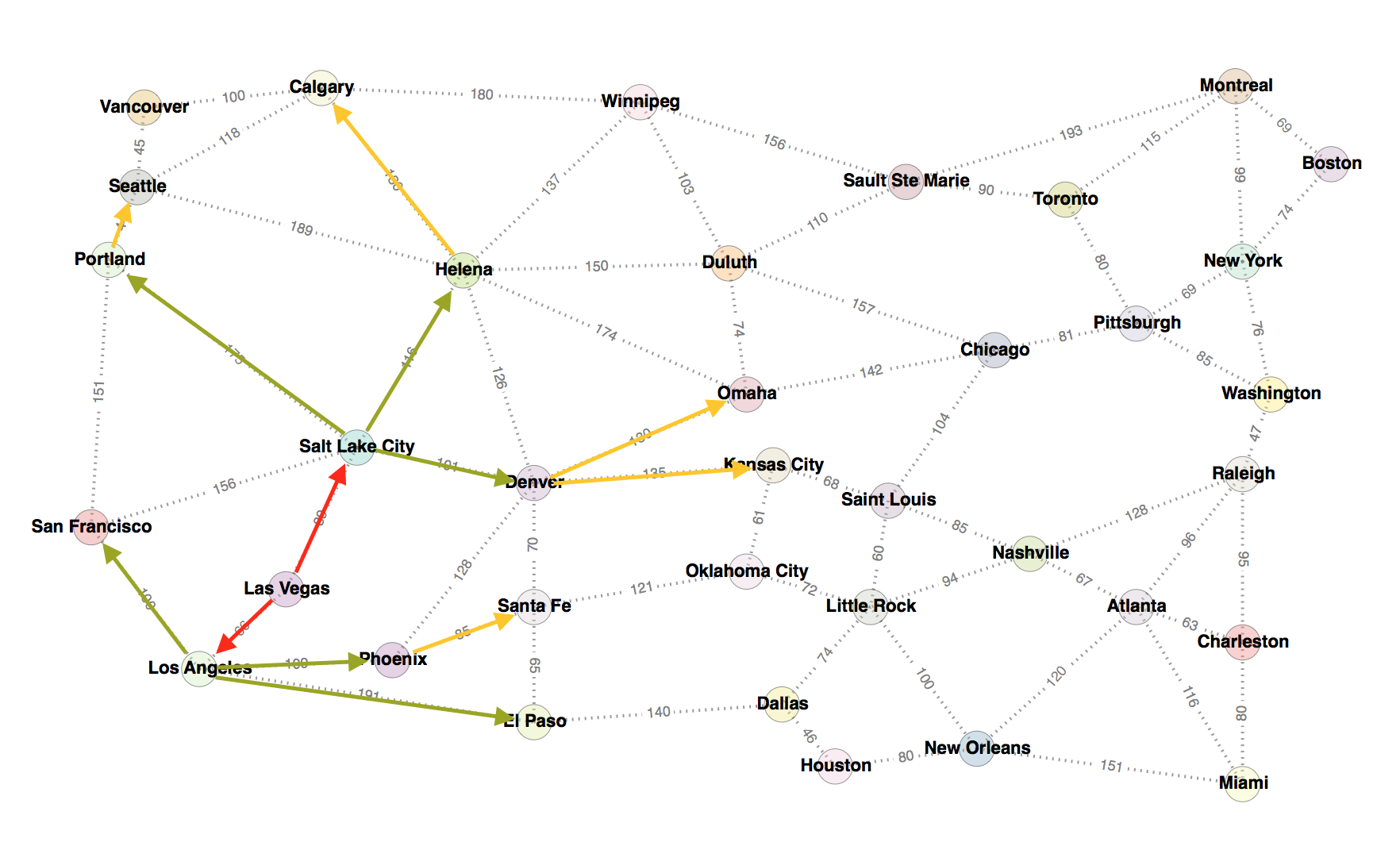
    Uniform Cost Search (UCS) traverses nodes by the shortest cost.

    Here’s an example of a map with a starting point from Las Vegas to the goal point Calgary.

    I’ve marked up the depth levels by arrow color. To determine the order, I needed to find the shortest cost between nodes.  It helped me make a tree on paper:

    I followed the cost path to output the order of visits:

    Las Vegas, Los Angeles, Salt Lake City, San Francisco, Phoenix, Denver, Helena, El Paso, Santa Fe, Portland, Seattle, Omaha, Kansas City, Calgary

    Sources: Wikipedia, ColumbiaX

  • Code Documentation Example

    Code documentation example with TypeScript.

    /** Class representing a point. */
    class Point {
        /**
         * Create a point.
         * @param {number} x - The x value.
         * @param {number} y - The y value.
         */
        constructor(x, y) {
            // ...
        }
    
        /**
         * Get the x value.
         * @return {number} The x value.
         */
        getX() {
            // ...
        }
    
        /**
         * Get the y value.
         * @return {number} The y value.
         */
        getY() {
            // ...
        }
    
        /**
         * Convert a string containing two comma-separated numbers into a point.
         * @param {string} str - The string containing two comma-separated numbers.
         * @return {Point} A Point object.
         */
        static fromString(str) {
            // ...
        }
    }
    

    Sources: Wikipedia